Sale
Sale!
VIDBOX Model 5591332
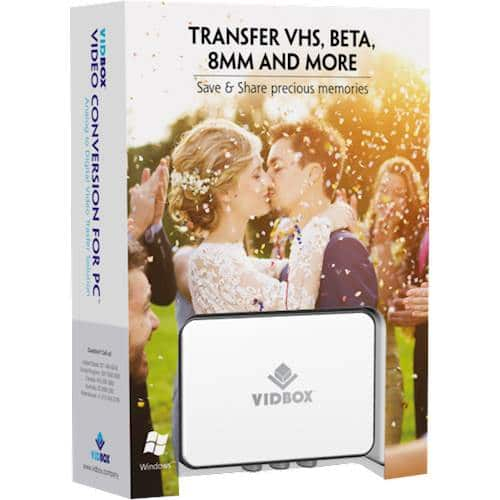
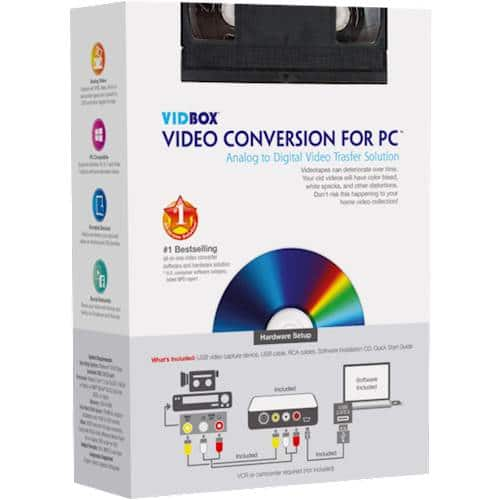
VIDBOX – Video Conversion for PC – Windows
★★★★★★★★★★ (4.2) 20 reviews
Original price was: $69.99.$55.99Current price is: $55.99. Save $14
In stock · Ready to ship
Delivery Mon, Nov 9 – Wed, Nov 11 Free shipping on orders $60+
Secure checkout · Visa · Mastercard · Amex · Discover · PayPal
Questions? Talk to a product specialist
(888) 519-3048
- Free shipping $60+3–5 business days
- 30-day returnsMoney-back guarantee
- Brand-newManufacturer warranty
- Ships from the USColumbus, OH
- Provides everything you need to easily convert your videos to digital formatsAll you need is a VCR and a PC with or without a DVD burnerThe step-by-Step pictorial instructions guide you through the processSave your precious memories before it's too late
Key specs
- Brand
- VIDBOX
- Model Number
- HON787800F283
- Product Name
- Video Conversion for PC
- Software Subject
- Photo editing
- Language(s)
- English
- Number of Users
- 1
- Number of Devices
- 1
- Brand
- VIDBOX
- Model Number
- HON787800F283
- Product Name
- Video Conversion for PC
- Software Subject
- Photo editing
- Language(s)
- English
- Number of Users
- 1
- Number of Devices
- 1
- Operating System Compatibility
- Windows
- Software Format
- Physical
- System Requirements
- OS: Windows 8.1, Architecture: x86, x64, ARM
- Publisher
- VIDBOX
- UPC
- 882960300938
- Provides everything you need to easily convert your videos to digital formats
- All you need is a VCR and a PC with or without a DVD burner
- The step-by-Step pictorial instructions guide you through the process
- Save your precious memories before it’s too late
Standard US ground delivery is $5.49 and arrives in 3–5 business days. Orders over $60 ship free. Returns are accepted within 30 days of delivery.
RedClaw1943 (verified owner) –
Working – Doing what I needed it for. The converting is working as I hoped it would.
Miguelon4u (verified owner) –
Good item – I buy this VIDBOX and I can now transfer all my old videos in my computer or burn DVD and we can watch with all my family.. thank you!
CRdrummer (verified owner) –
Don’t Purchase – Had to return because only the mono channel was working. They didn’t have this in store, but had a similar product which ended up working.
Murali (verified owner) –
Great product – Excellent product, works great for me.
So far, I converted 4 of my minidv camcorder cassette and it converted very well.
Note that for camcorder ( in my case, I have cannon ZR60 old camcorder from 2003) minidv cassette conversion, you might need the wires that came with it. At first, I was not sure. So I called customer support.
Customer support were helpful and were able to guide me.
T2inMI (verified owner) –
VIDBOX is a great tool to transfer to new media – This product worked like a charm for our purpose. I would highly recommend to anyone needing to move recordings from tape media to a computer/DVD/flash drive.
We have an old Sony camcorder that used the small cassettes (video 8, I believe). The recordings needed to be transferred to a different media before the tape became brittle and wouldn’t play back. We also had a couple VHS cassettes that had home movies of family and friends that were in the same situation.
Transfer services seemed to be a flat fee per tape regardless of how much was recorded on it. Some of our tapes had less than an hour so this was hard to justify.
The VIDBOX software was easy to install and followed basic file management layout and logic. It connected easily with the provided cables – to the laptop via USB and the camcorder and VCR with audio/video cables (red/yellow/white jacks).
Playing the tapes back for the transfer is little time consuming but that enabled stopping at the end of each recording and naming it something useful. Have not tried to edit any of the recordings but don’t anticipate it to be a problem as they are mp* files.
mavrangers (verified owner) –
Great – This makes copying old technology to newer much easier. I definitely recommend this to anyone wanting to preserve old memories.
ClarkeB (verified owner) –
Vidbox product worked as promised for 15-16 hours. – My Vidbox Video Conversion for PC originally did what it was supposed to do, record VCR tapes and convert the files to .MP4, once I figured-out how to set my Windows 10 permissions to allow Vidbox access to my camera and microphone (info is not included in the quickstart guide). The output quality of converted files seemed to be about the same quality as my original VHS tape, as played on my PC screen. Unfortunately, the unit I purchased worked for 33 days, or about 15-16 hours of actual recording time. In the middle of recording one of our family videos, it just froze-up and the base of the Vidbox unit felt overheated. Task Manager would not shut the program down, so I had to turn off my PC. Since then I have uninstalled and reinstalled the software, made sure that all the connections to the VCR and computer are solid, and double checked that my Windows 10 permissions for camera and microphone were set to allow Vidbox usage. I still get the error message “No Vidbox capture device was detected”. Every setting is the same as I had before the unit quit working. I’ve had this unit just long enough that I can’t take it back to Best Buy where I purchased it, so will have to see if I can get somebody from the Vidbox Support to answer their phone.
Nick123 (verified owner) –
VHS to cd – Very easy to use had no difficulty on moving old movies to computer and to cd.
DIYB (verified owner) –
Works ok. – Conversion runs smooth. It converts the sound with screeching noise in rare cases. I don’t know if this is caused by the converter or the player.
WarScorp (verified owner) –
VHS to Digital – This product delivers! So simple and easy to use. Convert those old VHS tapes now!
DaleJ (verified owner) –
Decent video capture. – Had a hard time trying to find a decent video capture and found this. Just wish it shrink the amount of space on a dvd.
user508119 (verified owner) –
Quick and easy – Did everything I needed it to do. I only wish the program was a little more simple for us stupid people.
MattV (verified owner) –
Did not have all the cables. – Did not have all the cables I needed. I needed s-video to s-video. That cable was not in the box and Best Buy does not sell them. So, I had to order it from Amazon. I’ll get it late NEXT WEEK! Ugh. So much for a weekend project. Caveat emptor.
SamuelC (verified owner) –
Great little adapter. – This unit, and the downloaded software make it extremely easy to convert VHS tapes to digital format. Wow!
lakersfreak (verified owner) –
Easy to use and good quality – Very easy to use. Extremely happy with the results. Love that I can now have my old VHS videos on my PC.
Andy (verified owner) –
Vidbox video conversion for PC – Device worked fine but I had to first download instructions from their website to change settings in windows 10. I was pleased i found this as it was just what I needed.
LionelC (verified owner) –
Excellent product – Very happy and pleased with the item. Worthwhile purchase
Verified Buyer (verified owner) –
it works just fine for me——————————
NoahN (verified owner) –
Works great, was able to successfully upload my videos
LaSi (verified owner) –
VIDBOX Video Conversion worked great – This video conversion software is perfect to convert old videos.