Sale


Sale!
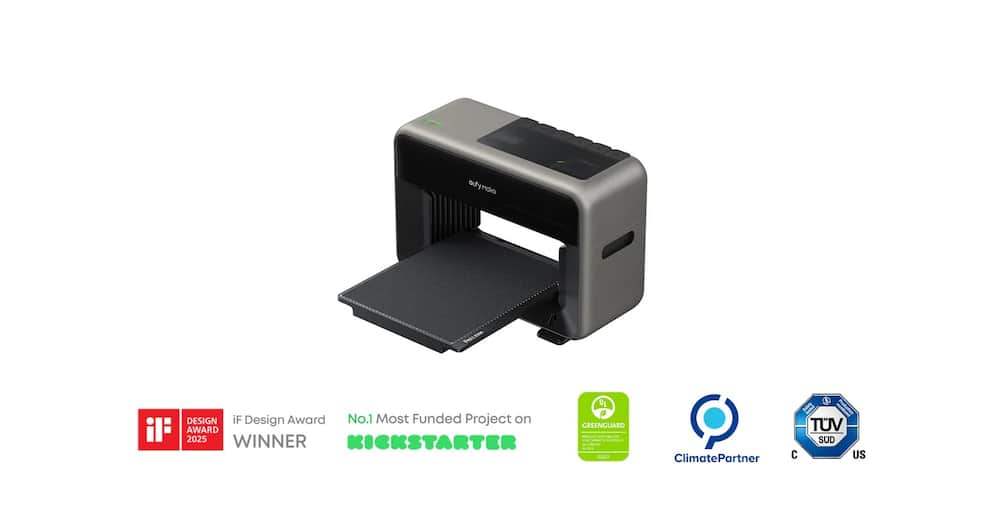
eufy Model 6673892
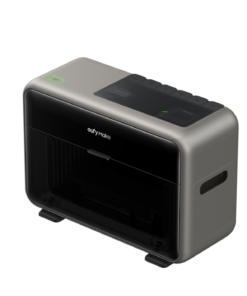
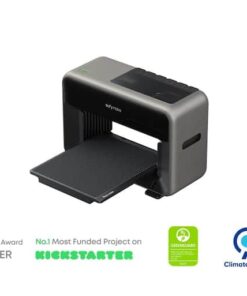
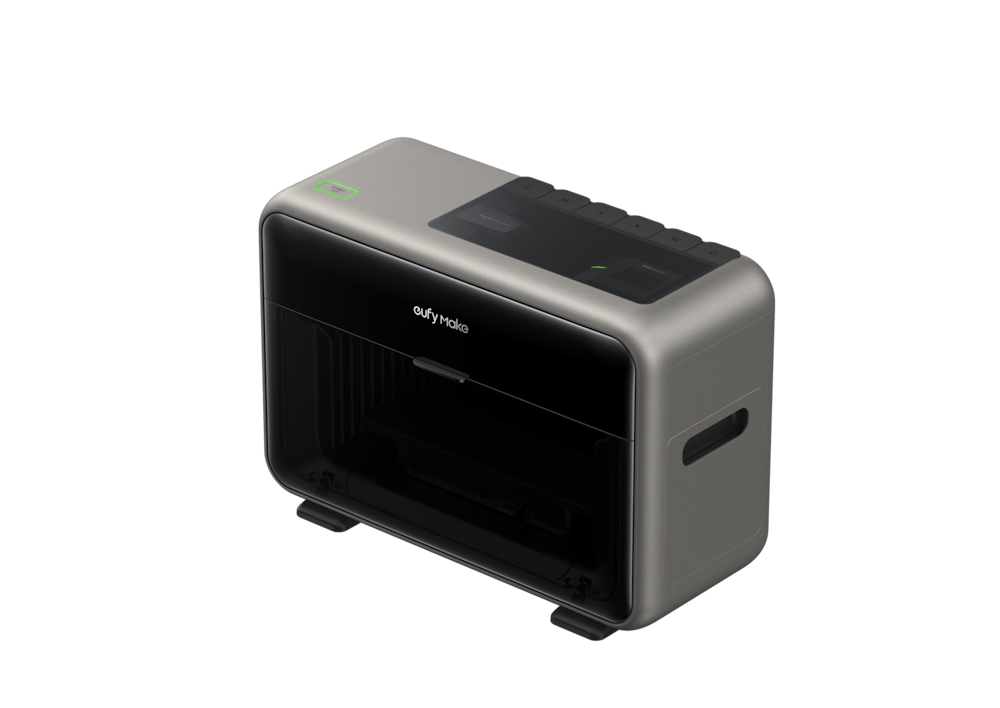
eufy – eufyMake UV Printer (Ink Sold Separately) – V8260J40 – Titanium
★★★★★★★★★★ (4.4) 20 reviews
Original price was: $2,199.99.$1,759.99Current price is: $1,759.99. Save $440
In stock · Ready to ship
Delivery Wed, Nov 11 – Fri, Nov 13 Free shipping
Secure checkout · Visa · Mastercard · Amex · Discover · PayPal
Questions? Talk to a product specialist
(888) 519-3048
- Free shipping $60+3–5 business days
- 30-day returnsMoney-back guarantee
- Brand-newManufacturer warranty
- Ships from the USColumbus, OH
- Ink Sold Separately Ink is required to start printing and is sold separately.
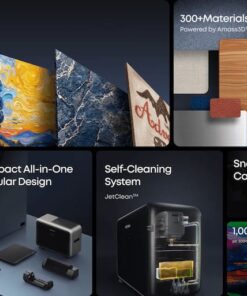
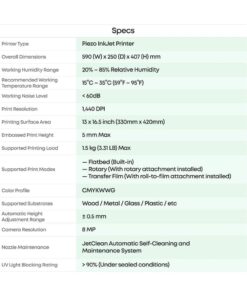
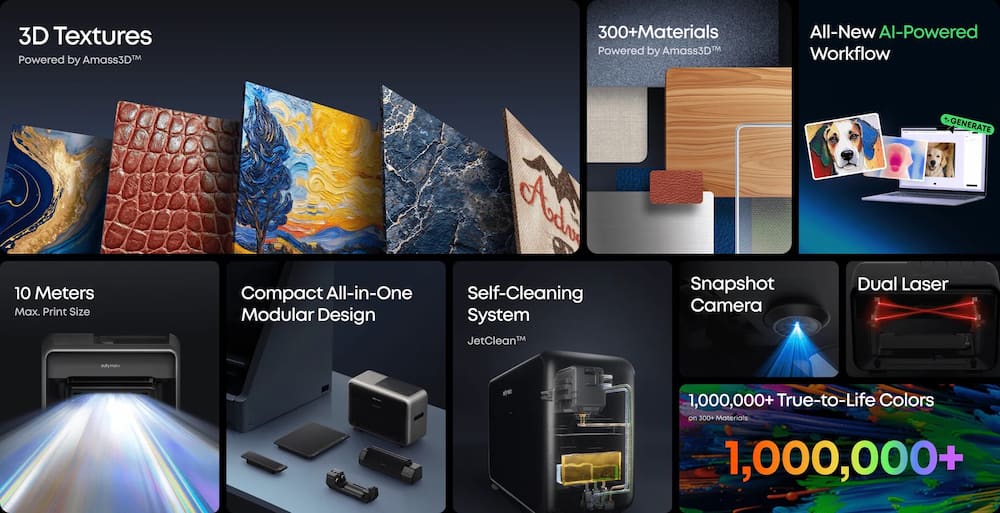
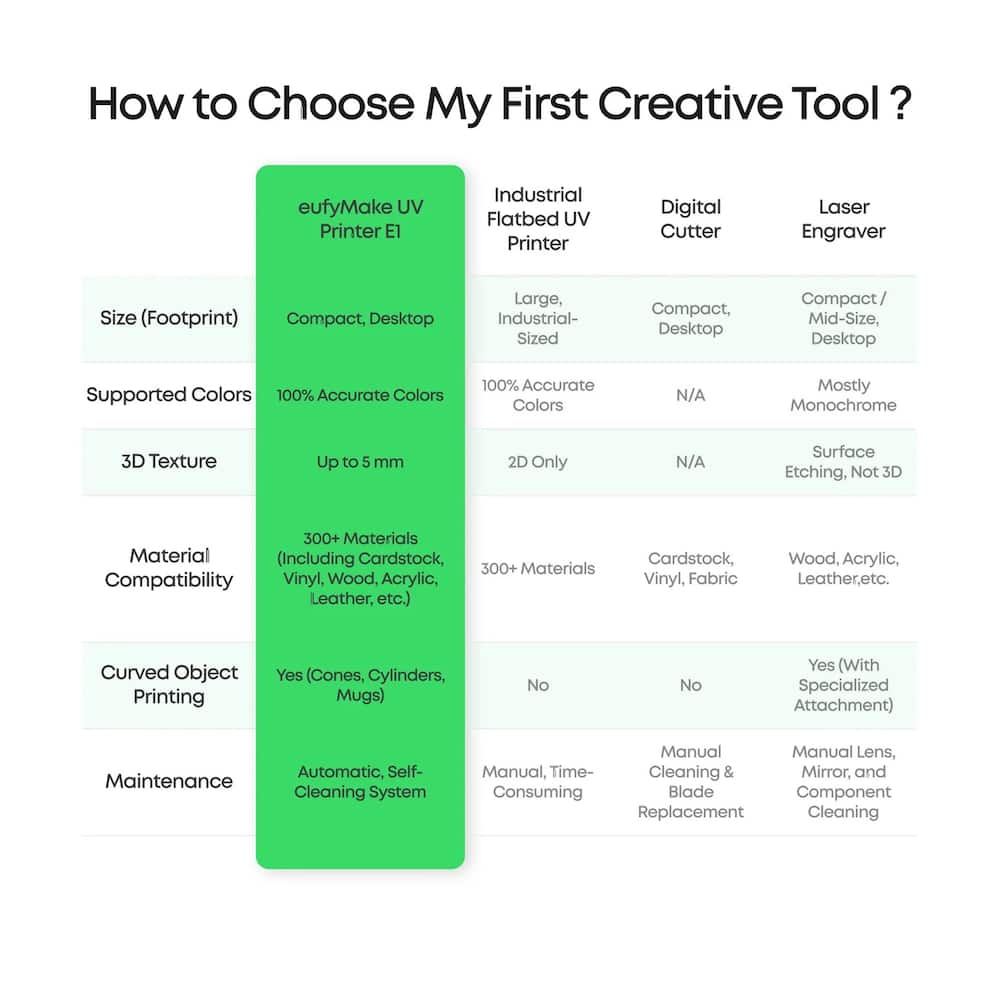
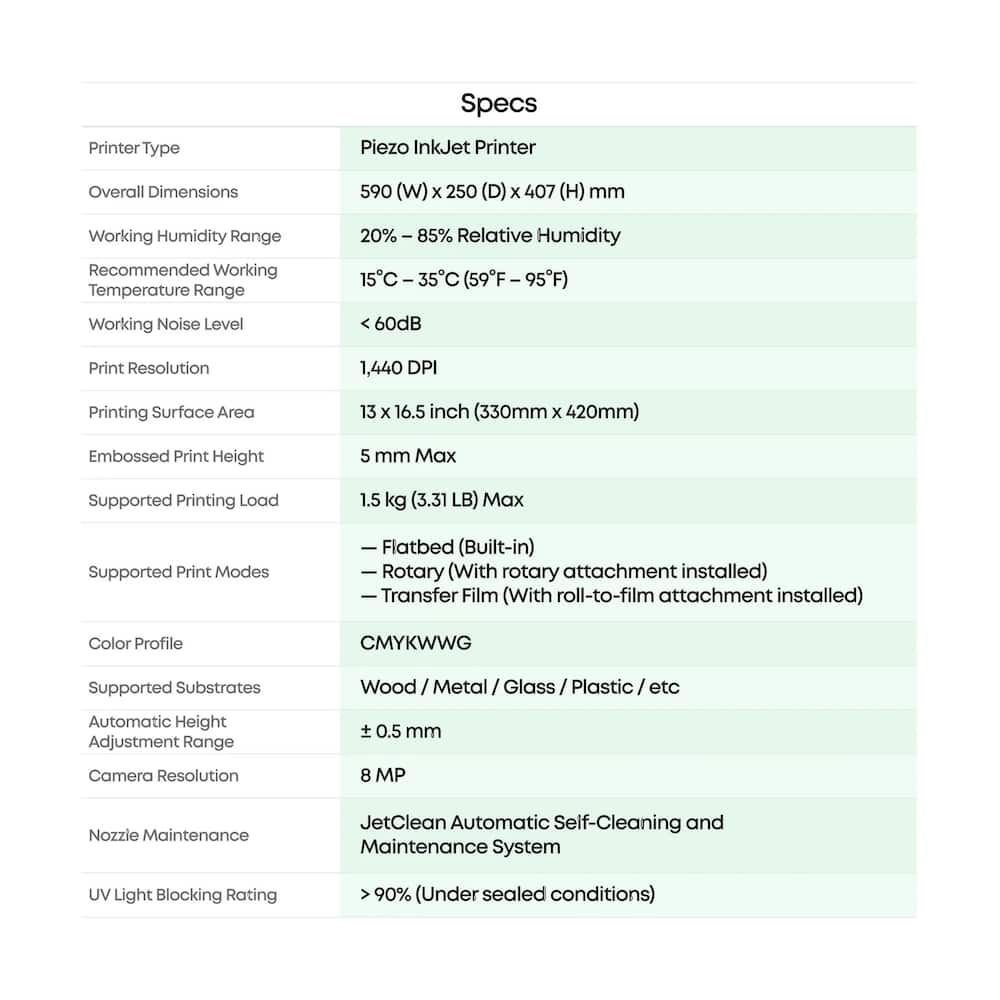
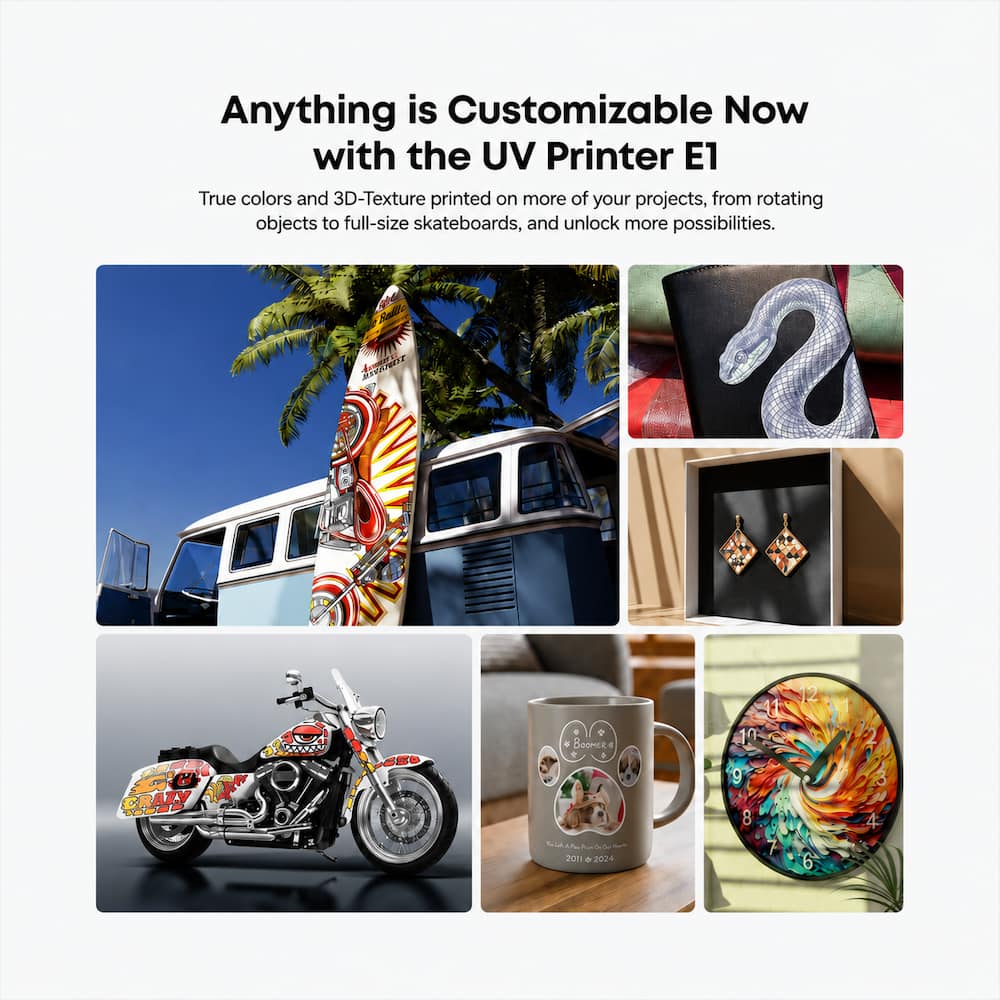
- Please pair this printer with the compatible eufyMake UV Ink Set for first-time setup and use.Make Anything Your Canvas Create custom designs on wood, acrylic, metal, ceramic, leather, glass, and more, ideal for personalized gifts, home decor, accessories, and small-batch products.3D-Texture Printing Effects Create raised textures up to 5 mm for embossed designs, oil-painting-style details, decorative accents, premium labels, and tactile finishes.High-Resolution UV Printing Print detailed, vibrant designs with up to 1440 DPI resolution for sharp graphics and professional-looking results across compatible surfaces.Compact Creative Production Tool Designed for creators, hobby-preneurs, and small businesses who want to produce custom products in-house without large industrial equipment.
Key specs
- Weight
- 56 lbs
- Dimensions
- 23.23 × 9.84 × 16.02 in
- Brand
- eufy
- Model Number
- V8260J40
- Product Name
- eufyMake UV Printer (Ink Sold Separately) - V8260J40
- Color
- Titanium
- Networking
- Wired
- Weight
- 56 lbs
- Dimensions
- 23.23 × 9.84 × 16.02 in
- Brand
- eufy
- Model Number
- V8260J40
- Product Name
- eufyMake UV Printer (Ink Sold Separately) - V8260J40
- Color
- Titanium
- Networking
- Wired
- Product Height
- 16.02 inches
- Product Width
- 9.84 inches
- Product Depth
- 23.23 inches
- Product Weight
- 56 pounds
- Printer Type
- 3D Printer
- Wired Connectivity
- Ethernet
- Wireless Connectivity
- Wi-Fi
- Warranty - Parts
- 1 year
- Warranty - Labor
- 1 year
- Display Screen
- No
- UPC
- 194644269197
- Ink Sold Separately
Ink is required to start printing and is sold separately. Please pair this printer with the compatible eufyMake UV Ink Set for first-time setup and use. - Make Anything Your Canvas
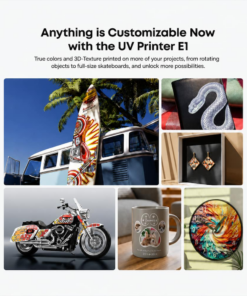
Create custom designs on wood, acrylic, metal, ceramic, leather, glass, and more, ideal for personalized gifts, home decor, accessories, and small-batch products. - 3D-Texture Printing Effects
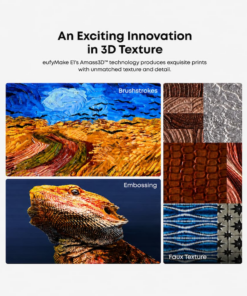
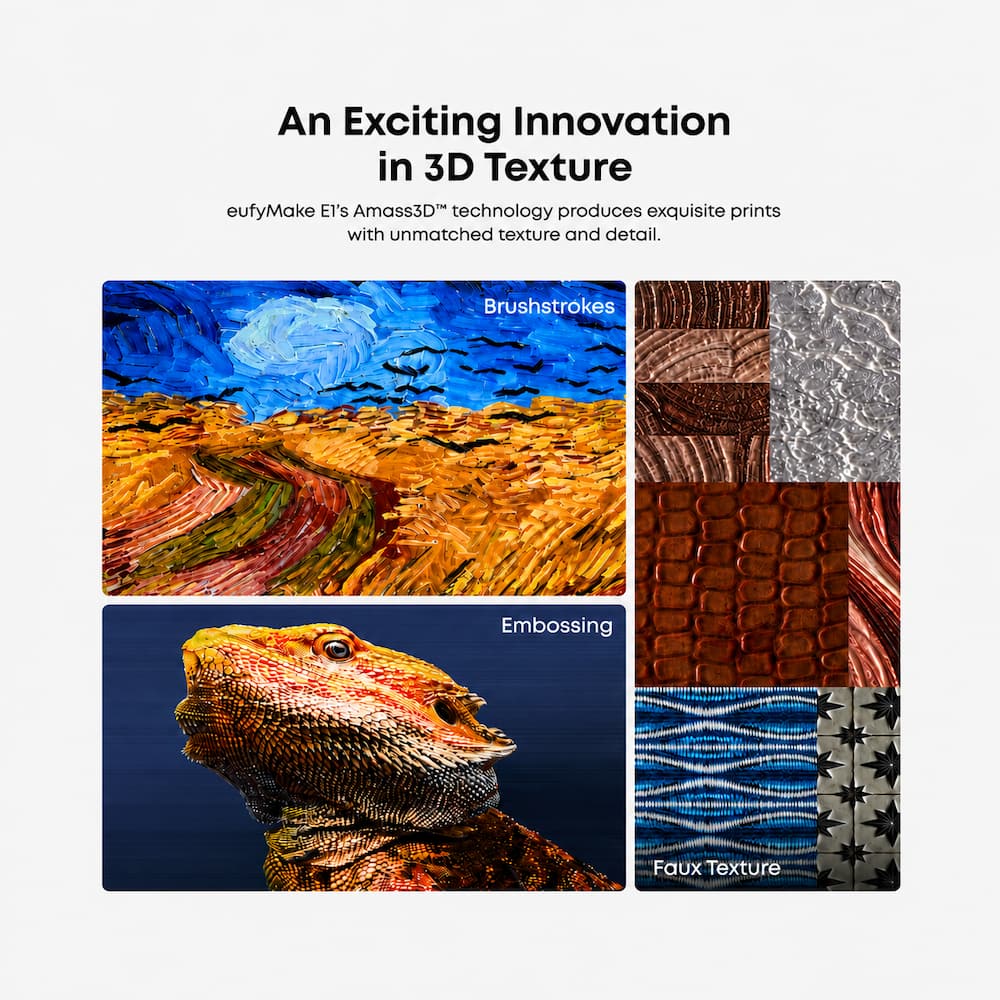
Create raised textures up to 5 mm for embossed designs, oil-painting-style details, decorative accents, premium labels, and tactile finishes. - High-Resolution UV Printing
Print detailed, vibrant designs with up to 1440 DPI resolution for sharp graphics and professional-looking results across compatible surfaces. - Compact Creative Production Tool
Designed for creators, hobby-preneurs, and small businesses who want to produce custom products in-house without large industrial equipment.
Standard US ground delivery is $5.49 and arrives in 3–5 business days. Orders over $60 ship free. Returns are accepted within 30 days of delivery.
Hindean (verified owner) –
Very unique printing device – This is definitely a hefty printer, appears to be well built. A little on the heavy side, but once you get it into place, getting the unit initially set up didn’t take too long, probably all together a little less than an hour to start printing my first item.
Of course the first thing you are going to do is print on the litte samples that come with the unit, it really helps get your feet wet. Surprisingly it wasn’t that hard, I figured there would be a lot of finagling involved to get the image I chose printed the first time, but that wasn’t the case, which I was pleasantly surprised about.
I do have to bring up the smell on this thing, whatever you do, make sure you either have a well ventilated area for this printer, especially when printing larger items, or leave while it’s printing and come back later, as it can be overwhelming. Outside of that, this printer has been a delight.
(I am now seeing on their website they offer an Exhaust Fan kit and Purifier P1 system, might be worth looking into.)
Also, I hope in the future to spring for the Rotary attachment, so I can start printing on tumblers and mugs. I really think that would take this thing to the next level, plus how cool would it be to make your own custom printed cups!
Pros
Prints on what seems to be everything
Beautiful colors @ 1440 DPI
Easy setup
Easy use
New addons for the device are still being made
Cons
The odor from large prints
Overall this is a good printer. There hasn’t been anything I have put in there it hasn’t been able to adhere to so far. The printing does take a little while to do, but not as long as you’d think.
Outside of the one job failing, yet ‘thinking it was complete’ (which was most likely my own fault). I would have to say this printer so far has been fun to work with.
I will be sad when I have to replace the ink as it appears to be a little expensive
(though when compared to an HP printer (joking here) it’s not much more expensive [not joking]), BUT it does look like they offer a good Ink subscription plan on their website at http://www.eufymake.com, which will be totally worth it to save 33%.
I would recommend this printer, if you are looking for something highly unique to use to print custom jobs, giving people something they don’t normally see every day makes this a fun niche item. Not to mention the folks at eufymake appear to actually support this machine, with new innovative ideas, from giving kudos to the family of users that have made their own addons for this thing on their own, sincerely makes me believe this unit will be alive and well in the years to come!
HBCUgrad13 (verified owner) –
Expanded Creativity! – [PROS]
Setup Process: Given that this is my first time owning such a device, it took me a while to read through the manual to understand the do’s and don’ts for getting started. However, the rest of the process became much easier. I got the ink installed, the device linked, and camera calibrated. From there, it was a more straightforward process with the software walking me through everything else.
eufyMake Studio: The software really allows me to explore my creativity and consider ideas to enhance my projects. There are a lot of examples and templates to build upon as a creator. It hasn’t been as complex as I thought it would have been. I’ve tested out the program by designing on top of pre-cut coasters. The application does well by detecting edges and giving me a great preview of the final product before printing.
End Result Quality: I was really impressed with how my coasters came out. At first, I just did a flat design to observe how the product would turn out. The surface was as smooth as it was before printing. I then tested with raised textures, and I could really feel the definition across the different points of the surface.
[CONS]
Extra Costs: The biggest drawbacks with this device can be associated with the price of ownership. Specifically, I’m referring to things that would need to be purchased to get full use of the the device.
Cups, mugs, and other cylindrical objects make for great projects, but require buying the rotary tool. Furthermore, ink is a separate expense when buying the device and is depleted continuously (although a minor amount) when the device is conducting maintenance.
[CONCLUSION]
The eufyMake is definitely worth buying whether it’s for business or personal use. I’ve already identified a dozen things that I own that I’m looking forward to customizing. Ownership does require spending more especially if you plan to run a business, but it would be great investment.
Patrick (verified owner) –
It’s A Brand New World of Creativity!! – A Printer That Opened Up an Entirely New World of Creativity
I had no idea what to expect with the eufyMake UV Printer. I was walking on ground I had never explored before. In fact, the first question that came to mind was, “What exactly is this?”
By now, I think just about everyone has heard of 3D printers and the fascinating things they can do. But this is not a “traditional” 3D printer. Nor is it anything close to a traditional 2D printer.
Yeah, it was confusing for me too—until I used it the first time.
When I got home and saw the box sitting on the porch, I was actually a bit confused. It was much bigger than I imagined it would be, and I started wondering what else I might have ordered that was so large. And honestly, it was much heavier than I expected, weighing in at around 56 pounds. I brought it inside and decided to wait until after dinner before tackling the unpacking and setup.
The first decision was figuring out where I was going to put it. I knew it was going in the home office, but at 56 pounds I wasn’t about to just throw it on a card table. I cleared a space for it on a sturdy wooden table instead.
The specs state that the printer is about 16 inches tall, roughly 10 inches deep, and almost 24 inches wide. But those dimensions don’t tell the whole story. You also need to leave a little over 15 inches of clearance from the wall so the back cover can open fully. In other words, this thing takes up a fairly substantial amount of real estate.
Setup Was Far Easier Than I Expected
Setup is amazingly simple, although it is a bit of a process. Because I had absolutely no prior experience with UV printers, I closely followed the instructions, which I found easy to understand and follow.
From unpacking the box to making my first print took around two hours, but I deliberately took my time to make sure everything was done correctly.
I emphasize the ease of setup for one reason: I was genuinely concerned that I would have absolutely no idea how to use this thing. I had no experience with UV printers or 3D printers, and looking at the machine initially, I expected a substantial learning curve.
Those concerns were wasted effort.
The eufyMake turned out to be one of the easiest pieces of equipment to learn and use that I’ve ever had. So if you’re looking at this printer and wondering, “Am I actually going to be able to figure this thing out?”—lay those concerns aside.
And Then I Made My First Print…
Once setup was complete, it was time for my first project.
This is also where I should mention the app versus the computer software. I found the computer software considerably easier to use and navigate than the phone app. That’s just my opinion, of course, but on the computer, getting started is basically as easy as clicking the “New” button and going from there.
And if you do get stuck, there are plenty of videos online showing you how to get started and demonstrating different things you can do with the machine.
For my first project, I deliberately kept things simple. eufy offers quite a few free projects to help you get your feet wet, so I chose to print on one of the three included magnet canvases.
That first print was an eye-opener.
After seeing how easy the eufyMake was to use—and seeing what it could actually produce—I started imagining all the projects that suddenly became possible.
And you’re certainly not limited to the pictures or projects offered by eufy. You can use your own pictures and photographs and print on an enormous variety of materials and objects.
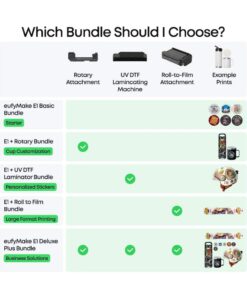
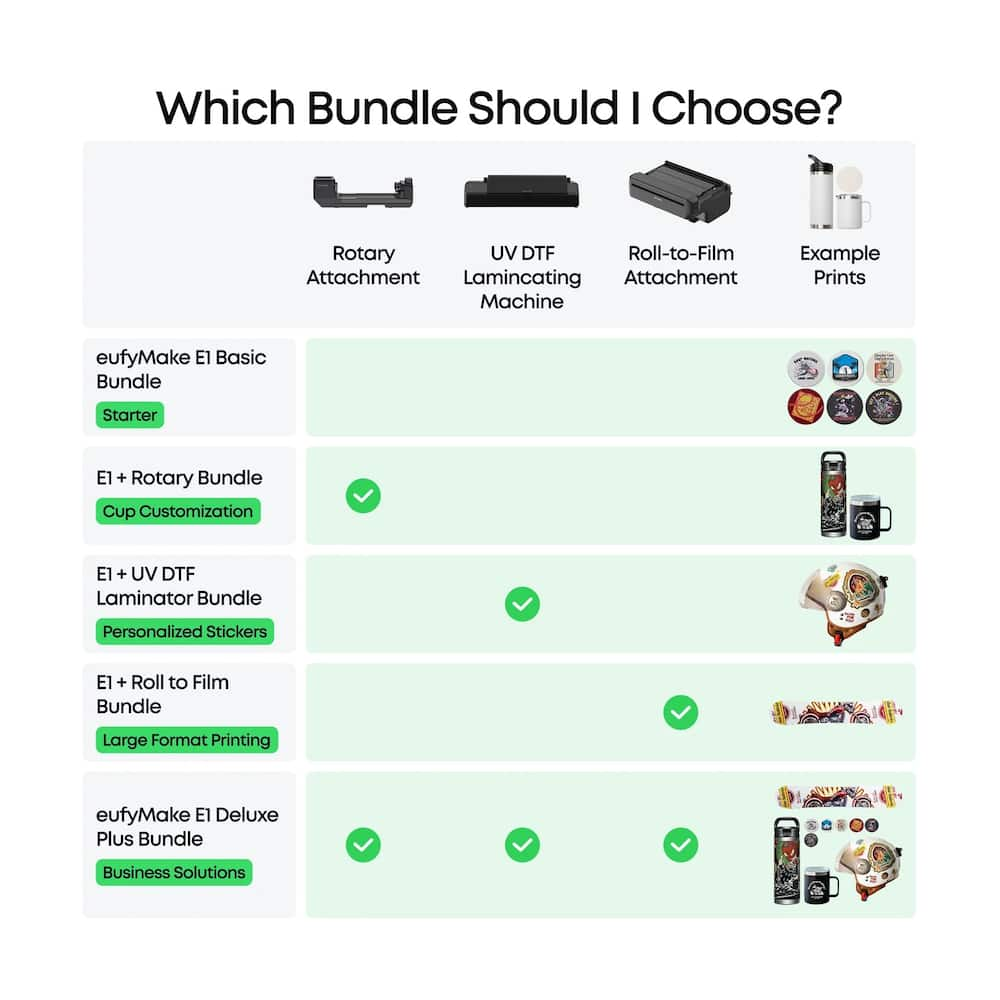
I was especially curious about how you could possibly print on something cylindrical, like a drinking glass. There is an accessory available for exactly that purpose. The rotary attachment isn’t included with the printer, but eufy sells it separately, along with a number of other accessories.
This Is Where Things Get Crazy
Over the next several days, I printed quite a few more projects, and this is where I discovered one of the most remarkable capabilities of the eufyMake: you can add actual depth and texture to a print.
I chose Van Gogh’s The Starry Night as an experiment.
The finished result was stunning.
When I ran my fingers over the surface, I could actually feel the texture—the brush strokes, the raised areas, the apparent depth of the paint. Obviously, I’m not claiming I recreated an actual Van Gogh painting, but the tactile effect completely changed my idea of what a “printer” could produce.
Then I decided to have a little fun.
I printed a baby dinosaur fossil onto a stone.
I took it to work with me and had people believing I had actually found a fossil in my backyard.
THAT is how realistic you can get with the eufyMake.
And that little dinosaur probably did more than anything else to make me understand what this machine really is. It isn’t simply about putting an image onto something. You can create an object that has enough texture, depth, and visual detail to make somebody want to pick it up and examine it.
The Rest of the Story…
I’ve focused heavily on ease of use because I really want to emphasize just how approachable this printer is, even for someone who has never touched a UV printer before.
But there is another part of the equation worth considering: the software and subscription tiers.
As with seemingly every company these days, there is a free version of the software, while eufy also offers paid tiers that provide access to premium features, including AI credits. A 12-month Plus plan is included with the purchase of the printer.
The free plan provides 200 credits per month, while the Pro plan provides up to 1,800 credits per month. One important thing to understand is that unused credits expire at the end of each month. They don’t accumulate or roll over.
Those credits give you access to some genuinely interesting features, but there’s another side to that: failures aren’t necessarily “free,” nor is endlessly experimenting with textures, layers, heights, and other AI-assisted features.
For the casual home user, I don’t consider that a deal-breaker. For a serious hobbyist—or especially someone thinking about using the eufyMake commercially—it’s something you should factor into the overall cost.
So, Is It Worth It?
I have to admit that I don’t have any major issues with either the printer or the pricing structure.
What surprised me most about the eufyMake is that it gives an ordinary person access to a level of creative capability that, not all that long ago, would have required specialized equipment, knowledge, and probably a considerable amount of money.
It’s one thing to take a photo with your phone and produce a photo-quality print.
It’s another universe altogether to create holographic-looking images, textured artwork you can actually feel, or a fake dinosaur fossil convincing enough to fool your coworkers.
And I keep coming back to that little dinosaur.
There’s something remarkably satisfying about holding something in your hand and thinking:
“I created this.”
It’s difficult to put a dollar value on that feeling. Add to it the reactions from other people when they see what you’ve made, and suddenly this stops feeling like just another printer.
I’ve already had several people ask me how they can get their hands on a eufyMake UV printer of their own.
I think that says quite a bit about the machine.
I started this review by saying that when the eufyMake arrived, I didn’t really know what it was.
I do now.
It’s a creativity machine disguised as a printer.
82jax (verified owner) –
Brand anything with your touch and design – If you are someone who likes to design and create your own products or just looking for ways to apply your personal branding to things, this is for you. This is not your normal printer, as it can literally print on anything you can place in the machine on the provided print board or additional printing accessories that you can purchase separately; tumbler/cup stabilizer for printing your designs with auto turn. As it prints, it prints in layers, giving your print a little bit of a texture feel once completed. One thing to note, it does utilize white as its base for most prints and more so on darker colored items you print to. You can have a matte finish or a shiny finish to your prints, depending o the finish you need. The design behind is printer is very user friendly and walks you through all of the setup process and any initial configuring before your first print. While this printer is really cool and I have been able to create a number of things, there are a few things to consider when purchasing this printer:
– You will need to make an initial ink purchase
– The machine will need to be kept on when not in use to ensure the cleaning cycle can process its maintenance cycles to prevent clogging and build up
– There is a slight chemical during use, similar to what you find when 3D Printing.
– You will need to ensure you have a fair amount of space allocated for the machine when printing on larger items.
This is a great addition to individuals and organizations that will use this more often than not.
ROBERTOL (verified owner) –
Hyped marketing, poor performer. – Slow printing. A letter size image will print in about 30 mins. If you add texture it will do in two hours. Not good for use it in a business. Ink bleeds. Can’t print on metal since the poor design of this machine uses magnets to close lateral doors causing any metal to be stuck with the magnets ruining a wasting lots of material (fixed by placing a large metal ruler on such magnets to diffuse magnetic attraction)… but bad design regardless… software lacks professional features, but most annoying is that you can’t use or manage layered files if printing offline. Manual says you can but in reality you can’t. Poor customer service. I have been doing chats for days. The ink bleeding is random. They do not care. Smell is strong. You can’t have this machine inside you home, you will get sick. Marketing images show a nice setup inside you home. That is not possible. They just came up with an extractor (about $180), another extra cost!! See my images, test prints and real printing examples, see how black bleeds on test print, or the black bleeding as horizontal smudges to the right side of the arm… the check how much printing quality varies in the one I am holding two pieces together. For a $3k machine a would expect much better real life performance. Also, the warranty on the print head is only 3 months. Ruin yours and you will need to pay $600 to replace. Very disappointing. There you go…. think twice before committing your purchase. As for me, I will most likely return it.
MoniMouse (verified owner) –
Great UV printer makes beautiful textured prints – This eufyMake e1 UV printer is not your ordinary printer. This printer prints on over 300 surfaces including metal, glass, plastic, acrylic, wood, and even fabric. It dries immediately as it is printed with the UV light so that when it is done printing, it is safe to touch without messing up the resin ink. The cool thing is that it prints textured prints they are such high quality that you would think they came from a professional. That is what makes this printer great for creators and small businesses wishing to create and sell things like coasters, ornaments, refrigerator magnets, cups, mugs, plaques, and so much more, all personalized to a customers desire.
In the box you get the eufyMake E1 UV Printer, standard flatbed, mini flatbed, standard adhesive mat, mini adhesive mat, air-filter cartridge, power adapter and cord, blue light blocking glasses, 3 free printing substrates, Quick start guide, and in box instructions. Please note that the ink does not come with the printer and must be purchased separately.
Setup. The first thing to consider when setting up this printer is ventilation. You want to put it in a room by itself or where it has sufficient ventilation. It doesn’t need to be around food, children or pets. The next thing is to remove all the foam and packing materials from the printer. There are a lot of places the foam is used inside. Make sure they are all removed. Download the Eufy app. Follow the directions on the sheet in the box and install the ink. You are ready to go.
Print quality is excellent. I had much success with the print quality of this printer. The colors were very vibrant, the print was very clear and detailed, and the picture came out very well. I really love how the colors popped out at me and were so vibrant. Then on top of the colors were a glossy finish that indeed finished off the picture. It’s a great piece that is all complete. These are UV cured resin that is also waterproof.
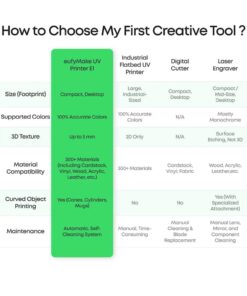
Material compatibility is huge for this printer. There are over 300 materials that can be printed on with this printer, including metals, plastics, acrylics, glass, wood, and so many more. There are some things like glass that will need to be treated with adhesion promoter before printing on them. Also, to print on cylindrical objects like a cup or mug, you will need the optional rotary attachment. There are also other attachments you can get for this printer too.
Two main users for this printer are Creative users and small business users. As far as the creative user, these users could use the printer to make personalized items for friends and family members. Things like coasters, ornaments, name plates, signs, personalized gifts, and so forth. This could get expensive for a hobby and is why a lot of people use this for small businesses. Using this for a small business, one could make and sell things like promotional items for a company, personalized items for a wedding or new baby, the list is endless on what can be created and sold. The business just has to plan for cost of the printer, ink, maintenance, and everything that it takes to keep the printer up and running in tip top shape.
Summary: This eufyMake E1 UV Printer is pretty awesome, and I’m glad I have it. I’d get it again if I had the option to do it over. I have a lot of ideas on how to utilize the printer to get a very small business going for myself making ornaments and refrigerator magnets for the holidays. I thought it might be fun. This printer is so easy to use and I love playing with art and graphics. It’s a win, win situation for me. The maintenance and ink may be pricy, but I plan to offset that with the things I sell so that I also have ink to make a few things for family and friends.
Yani77 (verified owner) –
Good but need improvements – Good printer. Amazing print quality, however be aware that you must print at least every two days because it clogged easily. I had to return the first one because it clogged after 3 days of idle mode. However I bought it again because it has a remote print feature. I leave several tiny pieces ready to print whenever I’m not home so I can send small print jobs remotely. That resolve that issue. Also the camera alignment feature is not accurate unless the items is on the center of the print bed.
softwareEngineer (verified owner) –
Look What I Can Do! – I’ve been able to print on wood, acrylic, glass, canvas, and ceramic. This is the first time in any review that I can say such a thing— heck, I even printed directly onto my AirPods Pro case. This was all made possible by the EufyMake E1 UV Printer, and I’m genuinely glad to have it in my workspace.
How It Works —
The eufyMake E1 operates using a piezoelectric inkjet printhead that ejects microscopic droplets of UV-curable ink onto the surface without ever touching it. Once deposited, built-in UV LEDs instantly cure and harden the ink, allowing it to build up rich color and tactile textured layers up to 5 mm high. Utilizing CMYK + White (and an optional gloss channel), prints come off the bed completely dry, durable and ready to handle immediately.
Setup & Hardware —
Setup is involved but straightforward. The eufyMake Studio desktop software or companion mobile app guides you through:
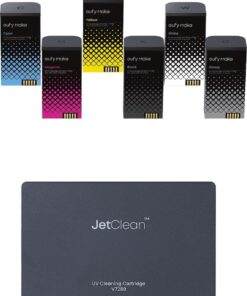
– Installing the 6 ink cartridges, cleaner cartridge, and air filter.
– Running printhead calibration and alignment tests.
– Running a test print using the included ceramic fridge magnets.
The base kit includes both a small and a large swappable tray. The maximum print area on the large tray handles up to a 12″x16″ footprint (which I tested with a full-bleed 12”x16” plexiglass print). To eliminate height guesswork, the E1 uses dual lasers and an onboard camera: the printhead moves into place, illuminates the bed, captures an image, and maps out contours and edges in 2.5D so the printhead knows exactly where it can safely travel.
Software & AI Features —
While the hardware is solid, eufyMake Studio is the real star:
– The Live Camera Overlay eliminates placement guesswork by letting you position, scale, and align artwork directly on top of the live camera view.
– Smart Texture and Masking is handled by AI automatically by detecting edges and adding appropriately raised 3D texture.
– Community driver content (“Make It Real”) lets you browse community templates for inspiration as well as allow you to contribute your own creations to other eufyMake content creators.
A Note on AI Credits —
eufyMake Studio uses a monthly credit pool for advanced AI masking and texture generation. Basic printing doesn’t require credits, but heavy texture workflows will consume them quickly. Unused credits do not roll over month-to-month, so monitor your usage before committing to an upgraded plan (like the Plus tier for 600 credits/month).
Ink Management & Estimation —
One thing the E1 does surprisingly well is estimating ink usage before a job starts. Every time you load artwork, eufyMake Studio analyzes the image, the required passes, whether you are adding 3D texture or gloss, and how much white coverage is involved. UV printers normally leave you guessing, but the E1 provides a clear breakdown of how much ink each cartridge will use and how much remains.
Because the system calculates consumption based on pixel data, planned layer thickness, and curing patterns, the estimate adjusts instantly as you add depth. Over time, this makes ink consumption predictable and takes the anxiety out of running out mid-job.
Each cartridge contains 100 mL of ink. White gets used the fastest because it serves as the essential opaque underbase on transparent, dark, or non-white substrates. Replacement cartridges are readily available individually, but eufyMake also offers an ink subscription model that saves on recurring supply costs.
Quirks —
The printer isn’t without quirks and from my experience, most revolve around the white ink.
– Maintenance vs. Injection Mode: When left idle for several days, the E1 enters an automatic self-preservation maintenance mode to prevent head clogs. Bringing it back online triggers an injection/priming cycle to purge micro-bubbles and repressurize the ink lines.
– Inconsistent Priming: Early on, the white channel occasionally failed to prime completely after sitting, resulting in a couple of wasted substrates. While recent firmware and software updates have noticeably improved reliability, UV white ink seems the most finnicky thus far.
Conclusion —
The EufyMake E1 successfully bridges the gap between industrial UV flatbed capability and a desktop-friendly creator tool. It is one of the first desktop UV printers that feels like a finished product; something you can set up in a home workspace without needing shop ventilation or specialized training. While white ink maintenance requires careful watching and the AI credit system takes time to understand your own individual burn rate, the print quality, textured dimensions, intelligent ink tracking and intuitive software make it an exceptionally capable machine.
Virgil (verified owner) –
The best DTF UV Printer – Just Exelent Recommended 100%
My wife are very happy with this purchase, she get accessories to this machine and everything works perfect no issues
MARK (verified owner) –
Such An Amazing Device & Top Notch Prints! – Being familiar with printing and printing devices for over 2 decades, I went into this device with tempered expectations. However, I was completely floored after my first print!
From the ease of use with the software, to how quick and crisp the prints looked, I could not be happier with how amazing this device is! It will definitely open up a new avenue of products for my projects and clients. I will say, definitely order more white ink and glossy ink from the start, as the printer uses more of those ink cartridges than the color ones.
Other than that, I highly recommend it!
BillnMish (verified owner) –
in the right hands, the possibilities are endless – Depending on how deep your wallet it this is *almost* the perfect crafters/hobbyist “toy”. If you are serious about either of those things, the EUFY UV Printer can easily be an income generator for you. But even for the casual weekend crafter, it can still be A LOT of fun and provide an endless amount of customization possibilities considering you can apply “prints” to just about everything you can fathom.
With that preface out of the way, let’s dig in.
What you get is a really stellar piece of equipment. Every single piece feels like you paid a good chunk of change for what you’re interacting with, which is great, because this thing is pricey. It’s at least reassuring that nothing feels cheap. All of the attachments and add-ons are exactly the same, they feel very well made and thought out, nothing feels brittle or makes you go, “man, I wish they reinforced this piece” or “that’s eventually going to be a problem”.
Once you get everything unboxed and setup, the instructions lead to the software, which you have to use to get things up and running. This part takes no time at all and next biggest hurdle is deciding where to start for your first project! For me I went with some mini-figurines that we usually paint by hand.
I scanned them into the software and started applying colors, “textures” and different things that I would usually avoid during the hand painting process as I’m not that steady of a painter nor am I that good, lol! But wow, were the results amazing. These figures are only 3″-4″ tall and everything is *exactly* where I placed it in the software. Absolutely beautiful results.
The only reason I’m detracting a star is for the ink; the cost associated with it *and* disposal. This stuff is pretty nasty (i.e. toxic) and I’m not sure how cool I am with that in the long run. Having said that, all technologies have their pros/cons so I guess you can chalk this up to “it is what it is” — but I still want to mention it all the same.
Absolutely love this thing and totally recommend it!
KEVIN (verified owner) –
Great When It Works – This thing is awesome when it works. Had to get a replacement 116days into ownership. Alot of issues with the print head but when it works good its flawless.
StephanieG (verified owner) –
Love the Machine, but… – supplies seem to not be in store. Love my UV printer, but I wish there was a better supply of items.
dLOnyApe (verified owner) –
Amazing prints, endless ideas, but watch out – I spent about three weeks using the eufyMake E1 UV Printer on and off. It’s not an awful machine, but I have quite a few concerns in spite of the amazing potential. It has issues that are hard to ignore, hidden costs, and some moments that can make question the overall proposition. However, overall, the idea and the “what if” factor about this machine is just so cool.
The print quality is genuinely amazing and keeps you trying different ideas. The colors are bright, the details are sharp even when printing a small design, and the finish looks professional. The 3D-Texture really looks like something you’d buy in a store. It pops out, I think most, if not all users would agree on this one thing, the print quality really is the standout quality of the device.
It prints on many different materials. Slate, canvas, metal, magnets, acrylic, thermoplastic, and business cards. Eufy claims that the UV printer can print on over 300+ materials. I printed on vinyl, on a few of our steel water bottles, silicone phone case, and a binder, to name a few. It’s actually really fun to start going around the house looking for things to print on. My kids looked forward to the checking out the results on a couple of their items. A plain faced water bottle turned into an anime work of art, for example.
Setup is mostly easy. Most reviewers average a setup that takes about 45 minutes, and that was close to my experience. I think I took over an hour because I wanted to read through the guides and watch videos on the printer but strictly setup was less than an hour. The mobile app walks you through everything. I think beginners will get good first prints without much of a hassle.
It is big and pretty heavy, so you need to plan on where you want to keep it full time. It’s not so loud that it sounds like a factory. With the heavy, stable, and premium comes the feeling like it’s a real commercial professional machine.
Now for my major hang-ups. The smell is bad and strong.
Multiple reviewers complained about strong fumes and headaches. I agree. I can get headaches from sitting near the machine if I’m not careful. You will definitely need ventilation — it’s the safe option. Open a window or use an exhaust fan if you’re enclosed in a small space. I don’t recommend printing in your small room or having your kids near the machine.
Another big hangup is that ink consumption is higher than you’d expect. The printer frequently runs it’s automatic cleaning cycles, and those cycles use ink. I think the white and gloss are especially affected. I would like official documentation to give us stats on usage and non-usuage patterns (for lack of a better word) so that owners can have an expectation of how much ink they need to buy. Some information to help decide whether to buy at all or if you buy, how much ink you’re expected to use on average. Maybe I have to do a better job looking. It seams to me that if you don’t print often, it wastes more ink because it cleans itself more often. I imagine that’s so the ink doesn’t get stale or clog the machine.
The other problems have to do with the ink. First, the retail package doesn’t include ink. A machine that costs thousands of dollars and you can’t include an ink starter kit. Then if any one ink color runs out, the printer stops completel. You can’t use the printer regardless which color is exhausted. If you have to buy ink be ready to spend a couple hundred dollars if you go with oem branded ink. There are third party cartridges but I’m on the fence about them but you will save some money but not as much as you’d expect. Also, not sure how that affects the warranty and longevity of the printer.
Lastly, the maintenance cartridge fills fast (another expenditure). Some people said they had to replace it every 30–40 days, especially if they weren’t printing oten.
And again: if it’s full, the printer refuses to print until you replace the cartridge.
People reported crashes, lag, and even extreme RAM usage with software. It works, but it’s not polished. I’ve had some headache but didn’t have any unsolvable problems. Physically, the printer is great, just make sure that you have everything lined up or you’ll ruin the print job and have to start over.
Overall, this is an awesome idea and machine that allows to cover almost any surface. Just be sure to consider the big big hit to your pockets and nose.
REGINAE (verified owner) –
Eufymake printer excellent – This printer has been the best addition to my business.
Carmen (verified owner) –
Five Stars! Ease of use. High quality Printing – Five Stars for sure! Ease of use. High quality Printing. Thank you Elizabeth @ CR Best Buy who sold me this printer!
Marque (verified owner) –
eufyMake is too much fun – Easy to use and I love what I’m making with it. I may end up getting a second one.
KRYSTAL (verified owner) –
Uv ink – Love that the price went down. Hopefully keeps going.
JoeS (verified owner) –
Great machine! – Big fan of this tool! Prints on basically anything and easy to use.
JeffreyD (verified owner) –
The textured printing is awesome. – Works exactly as advertised. The textured printing is awesome. Easy to use but takes a little time to get set up.