Sale

Sale!
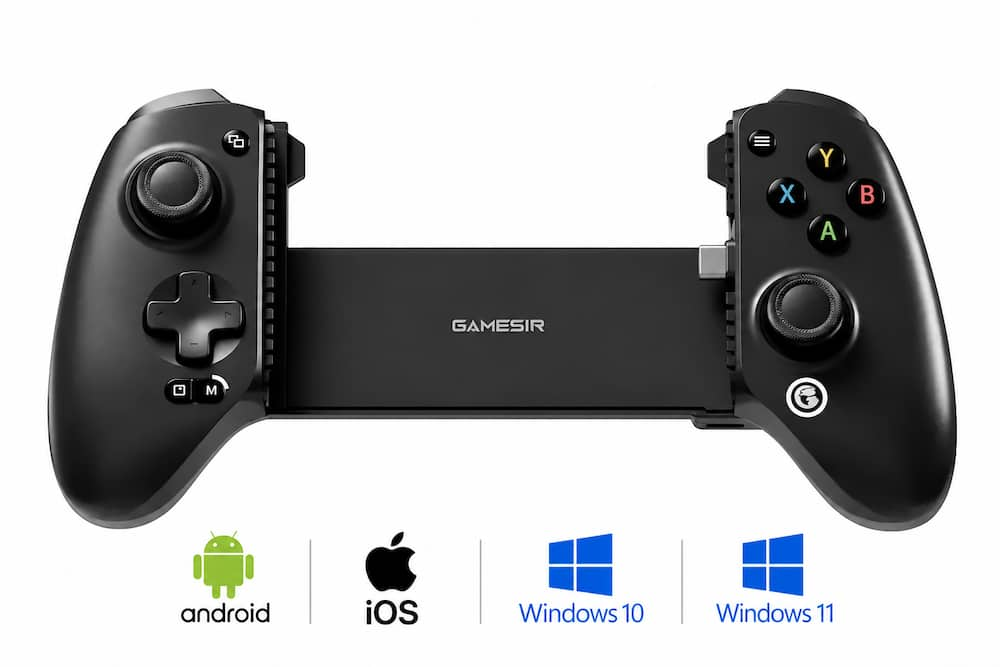
GameSir Model 6675169
GameSir – G8 SE Multi-Platform Wireless Game Controller iOS, Android, PC – Black
★★★★★★★★★★ (4.5) 20 reviews
Original price was: $59.99.$47.99Current price is: $47.99. Save $12
In stock · Ready to ship
Delivery Wed, Nov 11 – Fri, Nov 13 Free shipping on orders $60+
Secure checkout · Visa · Mastercard · Amex · Discover · PayPal
Questions? Talk to a product specialist
(888) 519-3048
- Free shipping $60+3–5 business days
- 30-day returnsMoney-back guarantee
- Brand-newManufacturer warranty
- Ships from the USColumbus, OH
- Plug-and-Play Enjoy instant wired connectivity with the GameSir™ movable USB-C port.
- Supports devices 92-172 mm in length and features optimized camera compatibility, accommodating even devices with large camera modules.
- Compatible with iOS, Android, and PC.The Anti Stick-Drift Solution: GameSir™ Hall Effect Sticks Equipped with GameSir™ Hall Effect sticks, the G8 SE ensures pinpoint accuracy with 360° seamless control.
- Using non-contact magnetic technology, these sticks are highly responsive and immune to wear and tear, providing an ultra lifespan of up to 5 million cycles and allowing gamers to elevate their gameplay across various titles.Precision-Tuned Hall Effect Analog Triggers GameSir’s precision-tuned Hall Effect analog triggers provide unparalleled smoothness and responsiveness.
- Additionally, gamers can activate hair trigger mode by pressing M+LT/RT.
- Whether you need precise linear control or instant response, it gives you the competitive edge.Cushioned and Durable Membrane Buttons Featuring cushioned membrane ABXY buttons and D-pad with a lifespan of up to 2 million presses, delivering comfortable feedback and long-lasting durability.Two Remappble Back Buttons The two easily accessible back buttons support single-button remapping, adding more control options to your gaming.Dual Motors in the Grips for Realistic Feedback Equipped with dual motors in the grips, the G8 SE delivers both strong and subtle vibrations, enhancing tactile feedback for a more immersive gaming experience.
Key specs
- Brand
- GameSir
- Model Number
- GameSir-G8 SE Black
- Product Name
- GameSir G8 SE Multi-Platform Wireless Game Controller iOS, Android, PC
- Color
- Black
- Product Type
- Controller
- Headset Jack
- No
- Rumble Vibration
- Yes
- Brand
- GameSir
- Model Number
- GameSir-G8 SE Black
- Product Name
- GameSir G8 SE Multi-Platform Wireless Game Controller iOS, Android, PC
- Color
- Black
- Product Type
- Controller
- Headset Jack
- No
- Rumble Vibration
- Yes
- Analog Joysticks
- Yes
- Button Mapping
- Yes
- Lighting Type
- Single color
- Illumination
- Yes
- Share Button
- No
- Wireless
- No
- Compatible Platform(s)
- iOS
- Warranty - Parts
- 2 years
- Warranty - Labor
- 2 years
- UPC
- 850074931140
- Plug-and-Play
Enjoy instant wired connectivity with the GameSir™ movable USB-C port. Supports devices 92-172 mm in length and features optimized camera compatibility, accommodating even devices with large camera modules. Compatible with iOS, Android, and PC. - The Anti Stick-Drift Solution: GameSir™ Hall Effect Sticks
Equipped with GameSir™ Hall Effect sticks, the G8 SE ensures pinpoint accuracy with 360° seamless control. Using non-contact magnetic technology, these sticks are highly responsive and immune to wear and tear, providing an ultra lifespan of up to 5 million cycles and allowing gamers to elevate their gameplay across various titles. - Precision-Tuned Hall Effect Analog Triggers
GameSir’s precision-tuned Hall Effect analog triggers provide unparalleled smoothness and responsiveness. Additionally, gamers can activate hair trigger mode by pressing M+LT/RT. Whether you need precise linear control or instant response, it gives you the competitive edge. - Cushioned and Durable Membrane Buttons
Featuring cushioned membrane ABXY buttons and D-pad with a lifespan of up to 2 million presses, delivering comfortable feedback and long-lasting durability. - Two Remappble Back Buttons
The two easily accessible back buttons support single-button remapping, adding more control options to your gaming. - Dual Motors in the Grips for Realistic Feedback
Equipped with dual motors in the grips, the G8 SE delivers both strong and subtle vibrations, enhancing tactile feedback for a more immersive gaming experience. Gamers can feel the precise feedback of crashes, gunshots, and bumps, enhancing the realism of your gameplay. - Turbo Function for Enhanced Gameplay
The G8 SE features a Turbo function with customizable buttons, including A/B/X/Y/LB/RB/LT/RT. This allows gamers to tailor Turbo settings for different games, enabling faster and more efficient gameplay by automating repeated button presses. - Pass-Through Charging for Uninterrupted Gameplay
Supports pass-through charging, allowing gamers to play while charging their device for uninterrupted gaming, even during extended sessions. - Software Customization Support
By downloading the GameSir app, gamers can perform firmware upgrades, adjust stick and trigger dead zone, customize vibration intensity, test buttons, and more. Some features can also be accessed through on-the-fly button combinations, ensuring seamless adjustments during gameplay.
Standard US ground delivery is $5.49 and arrives in 3–5 business days. Orders over $60 ship free. Returns are accepted within 30 days of delivery.
Ricky (verified owner) –
Last Mobile Controller You’ll Need!! – This controller is really nice! The price point is compelling and the feel/functionality are amazing. While the box does say for Android, it paired perfectly with my iPhone 17 Pro Max. That said, I did have to remove my case for it to fully seat; if you keep a bulky case on a large phone (similar size to the 17 Pro Max), just know you’ll need to take it off first.
Beyond that, the buttons, joysticks, triggers, and bumpers all feel great to use. They’re responsive and bounce back with no issues. The vibrations are satisfying as well. I also appreciate that you can use the dedicated audio input for headphones and the dedicated USB-C port to charge your phone simultaneously. The spring that holds it closed is pretty strong too; it’s not choppy or weak, so it opens smoothly. It also has bumpers where you place your phone, so you don’t have to worry about scratches or dings from normal use. They even included spare ones in the box, which was a lovely surprise.
Overall, a great controller! Sleek, easy to carry, and works with both Android and iPhone; checks every box for me!
Tekie (verified owner) –
Solid controller once you figure it out. – This review is on a GameSir – G8 SE Multi-Platform Wired Game Controller for Smartphones. This is my first mobile controller and I had something different in mind. I thought that all I had to do is plug my phone in and start playing. It depends on the game. I wanted to be able to play Call of Duty Mobile so that is where I started. The swivel design for the USB-C is awesome. The first time I plugged it in nothing happened. I installed the Gamesir app and it showed that the controller wasn’t connected. I tried to add a controller from the list that it gave me but it didn’t include the G8SE. I have a case on my phone and it looked as if it was connected. The controller comes with some extra pads and it comes with the thicker ones installed. Turns out it was too thick with my phone case so I swapped to the thinner pads and it connected. Then in the Gamesir app, it showed the right device was connected. Setting this device up was tricky. In the app it gives you instructions on how to make the device work such as enabling developer, debugging and wireless debugging mode. There are other things that have to be enabled and it took me a while to get it setup but I got it done. It has three modes. One of the modes are for games that are designed to work with these controllers. Xbox cloud gaming works well in this mode. No special programming. The 2nd mode is for games that are designed for touch screen. The app has an on-screen overlay to match the areas that you would touch the screen. You can program a button such as RT to touch the area on the screen that would cause you to shoot. So on the screen where that touch point would be, you would place a pinpoint and it will give you some options for what you can do with that button. Things like joystick mode, sliding mode, click mode, turbo mode, skill wheel mode, cast cancel mode, one button macro, gesture mode, cloned, click range mode, and sliding mode with options under all of the modes. None of this is in the manual and I had to go to Youtube to figure it out. The biggest thing that kept me from figuring it out is a red logo that floats half outside of the screen that you have to touch to bring up the setup menu. This logo will snap half outside if you try to drag it around. When you save your configuration it will float for a bit and you can’t do anything in game until it snaps half outside. There are files that are shared by other people that are already configured and you can download them. When you download them make sure to select use or nothing will happen. Once you get it setup right you will dominate other players that are trying to use touch screen so I have enjoyed playing COD Mobile. This is a huge advantage for games like this so I would recommend buying this controller.
PhillipB (verified owner) –
Super easy to use phone add on. – I have not used one of these joy con add ones to my phone so this is a first for me.
Setup was super simple. Plug and play with a caveat. I had to change the grip on the USB c side so that it can plug in all the way with my slip phone case.
ftet I changed the rubber grip it plugged in and allowed me to connect correctly.
There is a USB c and a headphone jack to allow for plug in.
I downloaded one of the recommended games that allowed integration and I was in playing.
Super easy to use and customize.
Sensitivity is really good.
Also programming of buttons was easy through the gamesir app.
Fit in my hand nicely.
Similar to typical game controllers on the market.
I did not see any lag due to direct USB c connection and not via Bluetooth.
NOTE make sure you look into the game that you want to use this with as not all games are compatible.
I wanted to use this with a game that I frequently use but it would have violated their 3rd party app usage and it would have booted me off their platform.
Other than that. Pretty nice add on to to use my phone to game. I could not take photos of my phone plugged in as it is my main device to do reviews etc. screenshots showed gamesir app use.
Lorax (verified owner) –
Well build – good action with tradeoffs – GameSir Makes a dizzying array of controllers, each intended for a certain niche. This unit is wired (USB-C only) and does not include Bluetooth. It also has no battery with automatic turn on when plugged into the pass-through charging port or the cradle USB-C port. The Bill qualities is excellent and they Hall effect sticks and analog triggers work perfectly. The feel on the buttons and D pad are excellent. The unit comes with a manual containing very little information, several silicone pads to allow many phones as large as a more than 6 1/2 inch Tall Moto play to fit. The cradle, USB-C angles to ease placement of the phone and the silicone pads, which are attached as well as the optional silicon pads, allow for positioning and Stability. The unit draws approximately 1 W so should not drain your battery quickly. There is however, a pass-through charger which also functions as a method to attached to a Windows computer. I was able to test with android, iOS, and Windows. The most annoying thing about working with this unit is the poor documentation regarding the modes available, including those that work best for android, Windows and iOS. The modes are switched by holding two keys for two seconds and there is a color change in the lighted lower button from blue to green to red. These modes enable switch mode, android mode and X input mode. The X input mode works with Windows as Batocera Linux. Note that the GameSir android app interfaces with this specific model, but the iOS app does not. For most, it should not be necessary to do any configuring or updating in the app and was not required for any of the multi platform games. I tried. The model link for tutorials does not lead to a description of this specific model, which is quite frustrating to a user looking for information. I have faced similar frustrations from other multi platform, third-party controllers.
An additional comment is the fact that this is lightweight and would be easy to transport as you would almost certainly always have a charger which could be used in the pass-through. These controllers are not something you typically leave on unless you’re actually using them. The absence of a battery is not a significant drawback.
swemoney (verified owner) –
Great phone controller for a good price – For the price of this phone controller, you really can’t beat it. GameSir is a new brand to me but I’ve tried multiple of their products over the last year and have enjoyed each one and been very surprised by the pricetag. This one is no exception.
Setup is mostly easy but it might take some extra steps depending on your phone and setup. My phone is an iPhone 16 Pro Max. With it’s case (which is not a bulky case at all), it was barely able to stretch wide enough to fit it. When it did, the USB-C port didn’t make an actual connection. Everything worked great when I took my case off, though. Luckily, I found the replacement side bumpers and one of them is very slim and flush for the USB-C side. Using that instead of the pre-installed one gave it enough clearance to still connect with my case on and it didn’t feel like as tight of a squeeze.
Once you have your phone connected, you then have to pick which controller mode you want which is something I never had to do before with these kinds of things. This GameSir is going for maximum compatibility so some concessions need to be made I guess. Holding Start and Select for 2 seconds switches through the three modes and I guess the iPhone needs to use the “other” mode which is denoted by a red LED. I wish they had a different color for that because it’s always red and red usually means bad so I wish it was orange or purple or pretty much anything but red. Android gets a blue LED and PC gets a green LED.
Last step was to chance the control style. By default, the “other” controls use Nintendo’s scheme which flips the A and B buttons and the X and Y buttons. But there’s a quick button combination (hold M + A) and it flips it back to normal.
NOW you’re ready to rock and roll! The analog sticks felt pretty good. The buttons felt good. The paddles on the back feel good to press but don’t get in the way and cause you to press them by accident (which is a problem I have with a lot of back paddles). Everything feels pretty good on the control side. The actual controller grips feel a little weird to me but I can’t place my finger on why. I think they’re just a tad too bulky looking? I don’t know why but it makes it feel a little more plasticy and cheap just based on the look. But the actual comfort while holding the grips is really good so don’t judge the book by it’s cover.
So all in all, everything works pretty well once you have it set up for your phone. The instruction booklet explains all the modes and settings you need to change as well as how to activate turbo mode and other things so take a browse through there. If you’re looking for a good phone controller without spending a fortune, this is definitely one to keep and eye on.
MacUser (verified owner) –
Mobile Gaming Finally Feels Like Console Gaming! – The GameSir G8 SE has completely transformed mobile gaming for me. I’ve tried several mobile controllers over the years, and this is easily one of the closest experiences to using a full-size console controller. From the moment I attached my phone and started playing, everything felt comfortable, responsive, and surprisingly premium. For anyone who takes mobile gaming, cloud gaming, or remote play seriously, this controller is an easy recommendation.
One of the biggest highlights is the excellent ergonomics. Unlike many compact mobile controllers that can feel cramped during longer sessions, the G8 SE feels like holding a proper console controller. The grips are comfortable, the button placement is intuitive, and even after extended gaming sessions I never felt hand fatigue.
The Hall Effect thumbsticks are another standout feature. Stick drift has been one of my biggest frustrations with gaming controllers, so having Hall Effect sticks provides peace of mind. The sticks feel smooth, precise, and accurate whether I’m playing shooters, racing games, or action titles. The Hall Effect triggers are equally impressive, offering excellent control and responsiveness.
Compatibility has been excellent as well. The controller works with iOS, Android, and PC, making it incredibly versatile. Setup was simple and straightforward, and I was gaming within minutes. Whether I’m using cloud gaming services, remote play, or native mobile games, the controller consistently delivers low-latency performance and reliable connectivity.
I also appreciate the extra features that GameSir included. The remappable back buttons are genuinely useful and add flexibility for competitive games. The vibration motors provide immersive feedback, making racing games, shooters, and action games feel much more engaging. Small touches like these help the controller feel far more expensive than it actually is.
The GameSir G8 SE delivers everything I want in a mobile gaming controller: comfort, precision, durability, and broad compatibility. The Hall Effect sticks and triggers alone make it stand out from many competitors, while the console-quality ergonomics make long gaming sessions enjoyable. Whether you’re using Xbox Cloud Gaming, Steam Link, PlayStation Remote Play, or traditional mobile games, this controller elevates the experience significantly. For the price, it’s an outstanding value and one of the best gaming accessories I’ve purchased.
Duluthian (verified owner) –
Feels & works great – The GameSir G8 SE has been a lot of fun to use. It has the feel of a console game controller. So if you are familiar with the big name game consoles or have used a similar controller for your PC, you will feel right at home. The unit feels well made and the button placements are logical and intuitive. Connection to your phone is by way of USB-C so you will be able to use it with just about any phone that has come out in recent years. Using it with Terraria, the controller is very responsive and is pretty much plug and play. It also holds the phone snug so you shouldn’t need to worry about it falling out if you’re really getting into the game. As to be expected, depending on the game you’re playing you might not need every button. But if you do you will find everything falls right in line. Using this gives a much better experience with phone gaming than I ever could have imagined. If you are a heavy gamer you will wonder how you ever got by without it. If you are a casual gamer, you might find yourself playing games a lot more than before.
btb2k (verified owner) –
Awesome controller that feels like Xbox controller – I decided to get this controller as I wanted to see how far controllers for mobile have come and this one definitely doesn’t disappoint. I have an S26 Ultra and it fits/works great and has enabled me to play Diablo Immortal, Minecraft and Grid Autosport.
First, I’d say that the overall fit and feel is similar to that of an Xbox controller so to me felt very familiar and it performs quite well. Because it connects with a USB-C plug to your phone, there’s no need to worry about cords or pairing to Bluetooth. It is also universal to devices it seems and worked on my brothers iPhone (now he’s going to get one) and it even worked when plugged in to my desktop PC.
The feature I think that I like most is that the controller has a Passthru mode for power so that you can keep power going to your phone during game play so you don’t have to worry about draining your battery completely for longer gaming sessions. Because it’s not wireless the connection is solid and there’s no lag or delay on key/button presses.
Vibration works but is very dependent upon title and platform so it’s hit and miss as to whether that works or not though it’s not a hardware issue.
If you haven’t tried one of these or you’re looking for a gift for someone that plays games on their phone, try one of these out. I kind of wish I had known it worked with games like Diablo and Minecraft.. it makes the whole experience of playing a mobile game completely different and this controller so far has been good and one I’d recommend trying out!
RedMage (verified owner) –
Great controller, iffy case compatibility. – The GameSir G8 SE mobile game controller is a nicely built responsive game controller. While the packaging is marked as for android, I had success sing it on both my android and iPhone. For iPhone if you hold the “start” and “select” buttons for a few second the controller will change modes, it can cycle through 3 modes, “green” “red” and “blue” I am assuming these are all like xinput, vs other input modes or whatever, but on the “red” mode I was able to use it just fine on games on my iPhone. While on android it worked fine basically in any mode.
Though on iOS it doesn’t have an entry in the GameSir app so you cannot rebind controls or setup screen zone mapping or anything fancy.
Overall I like the controller, the USB C connection has enough flexibility that getting a controller hooked up works fine weather it’s a thicker or thinner device. However, despite including different sized phone grip pads in the package, if your case isn’t fairly thin, you may not get a solid connected, and if your phone case has a cover for your charging port your going to have to either remove the case when using the controller or just get a new case overall, kind of a nitpicky complaint, but I dent to use otter box cases that are more bulky and that gets in the way of really using this controller to it’s fullest for me.
So if you have a more bulky case, I’d recommend getting a bluetooth enabled version of GameSir’s mobile controller to save yourself a small headache.
End of the day though, it’s a comfortable controller, has a USB-C passthrough charging port and a headphone jack built in so you can use wired headphones and charge while you play. I dont play a lot of mobile games, but being able to just use my phone like a PSP and play some games on break was a nice change of pace.
82jax (verified owner) –
Direct connection, USB-C, Custo via app, no latenc – This mobile gamepad is a strong competitor to other options available out there. It falls into similar game console controllers to fit comfortably into your hands during gameplay. Best for all of the various First-Person games where a touch screen may not always be the best option. The triggers and joysticks on these have little to no dead zones while being as precise as possible. This is a direct connection gamepad, so there is no Bluetooth latency involved. With USB-C as the direct connection, players can charge their phones and play with ease. The controller is customizable via the GameSir app that also supports direct mapping for games that are touchscreen only. The app is compatible with Apple and Android devices, quick install, and setup. The app is the main means of getting updates for the controller, controller tunning, button remaps. While the app is not overly complicated, it is simple enough that anyone can utilize to create their own custom gaming presets. Overall with the design of the mobile controller, it can support all current mobile devices within a certain size taking advantage of the current USB-C standard on today’s devices. Not a bad travel and quick start to have something when on the road.
ZachG (verified owner) –
I actually like gaming on my phone now!
I’ve never been a “casual” gamer with my phone, simply because I can’t stand touch controls. I’ve tried and tried over the years but always abandon any game I purchase for my phone after less than an hour because it’s just so tiresome. Since picking up this controller, my abandoned game library has sprung back to life.
I am currently using an iPhone Air, which is quite tall and skinny for a phone, and it fits the controller just fine. There’s even more space than I’m using, so I’m certain this would fit just about any phone in the market right now (besides maybe those giant foldable monstrosities). Speaking of an iPhone, I did have to switch modes on the controller to get it to work. The instruction manual isn’t very clear, but there is an “Android” mode, a “PC” mode, and an “Other” mode – if you are also an iPhone user, you’ll need to put it in “Other”.
Outside of that one setting change, it’s been plug and play. The controller is powered by your phone itself, so there’s no need to remember to charge it up. Every game I tried recognized the controller right away and I didn’t need to set anything up. The controls themselves are comfortable and responsive, and if you’ve ever played on a Nintendo Switch OLED, the controller is about as wide as that (and way more comfortable to use).
My abandoned game library thanks me for picking up this controller, and it’s been a fun couch companion for me.
MoniMouse (verified owner) –
Good controller for on the go. – This GameSir G8 SE Multi-Platform controller has proven to be a great addition to my gaming collection. At first I didn’t think I was going to like it too much. I had trouble figuring it all out. It wouldn’t work for me at all. I read a little more and realized that it wasn’t connecting. I had to remove the case from my Samsung Galaxy phone. After I did that, it was a breeze to connect and start gaming with the controller. It’s always something simple that I overlooked because I get anxious and in a hurry to play with my new “tech toy”. Anyway, I have two phones, the Samsung Galaxy and an iPhone 16 Pro. I was able to connect to both of them and play games. I played several games from several places and had no issues at all. The places I played from were the Xbox Play Pass, Google Play Pass, and Apple Arcade. Some games do not use a controller, and I couldn’t get them to work with this one, but for the most part, almost all the games I normally play work with this well.
I love the fact that I can charge my phone while playing. There is a charging port on the bottom of the controller that is a pass thru charger. Excellent feature. It also has a 3.5mm headphone jack. Neither of my phones have a headphone jack, so I’m also loving this feature too.
The quality and feel of this controller is great. It feels solid and not cheaply made. The USB-C connector is flexible, so that helps to not damage your phone.
In the box is the controller and a booklet. The booklet is very helpful as it tells you exactly what is what on the controller and how to set it for different modes.
Different sizes of phones are okay to use with this controller. I have used two different sizes thus far, and both worked great.
Compatible platforms for this GameSir G8 SE game controller are Android, iOS, Windows. I connected to my phones by putting the phone on the controller and using it that way. I also used it with my gaming laptop with Windows, my iPad, and my Samsung Galaxy Tablet by connecting a USB-C cable to the USB-C connector.
Summary: This is a very nice and solid game controller that works well. It’s a wired controller and not wireless, but that is okay with me. I love that I can charge my phone using the pass thru charging port on the controller. I recommend this controller to any avid gamer.
FrozynHeart (verified owner) –
Great for both Android and PC gaming on the go – Disclaimer – I don’t game on iOS, so I haven’t tested this controller on that platform.
I’ve tried a few mobile controllers over the years, but I honestly think this one is my favorite so far. It has a really good balance between being small and portable while still being large and ergonomic enough to not make my hands cramp from trying to hold it. It’s also the first phone-clamp controller I’ve seen where the USB connector is flexible – this is super nice because it makes it so much easier to connect or disconnect the phone when you’re not having to fight the tension to do so. It’s also super neat that it has an AUX port – if you have a wired headset, you can use that while gaming.
One thing that I found really cool was that if you don’t insert a phone and instead connect a USB-C cable between your computer and the passthrough charging port on the controller, it shows up to your computer as an Xbox controller. I don’t think I’ve ever seen this before. This immediately makes it even more useful, since if I’m traveling I only need to pack this. I can game on my phone during a flight or train ride, and can hook it up to my laptop in a hotel room or whatever. No need to pack a second controller.
The controller works pretty well with games with on both Android phones and PC. Minecraft and Genshin Impact both worked great out of the box on my phone, and since it just shows up as an Xbox controller on PC the support there is perfect. If you encounter a mobile game that doesn’t support controller inputs, you can use the Gamesir app to configure touch translation (though, none of the games I played ended up with me having to do that). You can also use the app to configure the buttons on bottom.
The controller feels nice to hold. It’s smooth on top and has a textured grip on the bottom. The plastic is light but feels sturdy, the joysticks are smooth to move and responsive in-game, and the buttons feel good to press. Honestly, the whole thing feels almost like a normal Xbox controller if it were a bit more compact. I haven’t had any issues with the buttons missing clicks or feeling unresponsive, and it handles just like I’d expect from a normal game controller.
Overall, I’m really pleased with this controller. It’s just good all around for its intended purpose, and the fact it works on PC was also a really nice surprise. If you’re looking for a controller for your phone and you also do PC gaming on the go, I think this controller would be an excellent purchase.
Mike777VSP (verified owner) –
This ROCKS! – I just purchased a new phone and couldn’t wait to try this GameSir wireless game controller. I love to play online games (racing, strategy games) and even w/ my new phone it just isn’t the same as playing on a console. But this changes things, I really, really like the versatility of this controller and how easier it is to play games on my phone. The layout of the controller buttons is very comparable and compatible w/ the controller I use on my gaming computer and our console system. It’s very lightweight but very well built and laid out. I had purchased a case for my new phone and I did have to remove it to attach the phone to the controller, that is the ONLY drawback that I have w/ this controller, and that is not the fault of GameSir, its the case that I chose for my phone is extremely bulky to protect it from drops.
The only other drawback is I took this to work one day and I couldn’t put it down, it makes gaming that fun and so much more “funner” to play. My college aged son tried it and said he wanted one for Christmas and he readily agrees, this ROCKS!
Tstall (verified owner) –
Not the best for iPhone – The GameSir G8 is a good gaming handset for any smartphone. The box does state it’s for Android but I can confirm it does work with IOS but I had difficulty with it. I’m actually confused with the product as it says multi platform but I feel like it might truly only be for android.
Unboxing was straight forward as it just has some packing material, the controller and a manual. I downloaded the Gamesir app but it does not have the G8 SE listed. My iPhone 17 pro max would only fit with my Casetify removed. I can remove the silicon holders but I don’t think I should have too. The usb c male connector does swivel to help with installation and removal of a phone. It just doesn’t extend to help with connection. I did what was suggested and held the sandwich and Picture in Picture (two squares) buttons and the Gamesir button turned red and worked with my iPhone but still couldn’t get it to communicate with the app.
Once I was in iOS mode I was able to control some of my phone. I downloaded a game as the Apple Arcade store instantly opens with the controller. Downloaded a game and could not get anything to work….I honestly don’t have patience to jerryrig something in today’s world of iPhones and devices. If it doesn’t work it’s not meant to be.
I determined it just must be for android or works best with android. Someone may know how to connect or customize an iPhone with the G8 SE but it’s not clear how to do it. Giving 3 stars as it may honestly work great with android.
callmeageeth (verified owner) –
Console feel, budget price, growing pains – I’m a big gamer, but have been late to the party with mobile gaming. Reason being, touchscreen controls (outside of simple touch friendly games). I need a controller. The Gamesir G8 SE is the budget conscious model compared to the G8. It tackles the biggest gripe I have with mobile gaming, giving you a console control – with Xbox ergonomics – to play games on the go with a device (phone) that everyone already has.
When you pair it with Xbox Game Pass, it turns your phone into a legitimate console. But not everything was smooth sailing – from lag and connection speeds (not necessarily because of the controller) and difficulties integrating with mobile games (i.e. Call of Duty mobile doesn’t natively support USB-C controllers).
WHAT’S IN THE BOX
The packaging is lean, you’ll get the controller (no additional sticks or caps) and a user manual. You’ll also have a few extra rubber bumpers for your phone. Best I can tell, they’re the same thickness – they’re just there if yours wear out. On the one hand, I like the simplicity, but some might prefer swappable faceplates or thumb caps which are included in other versions of Gamesir controllers.
DESIGN AND BUILD QUALITY
In terms of the design, I like it. It’s a full sized controller. It’s not bulky to carry around – for what it is – and if it were any smaller, I would defeat the purpose. It’s a solid build that feels rigid with no creaking or flexing. It feels extremely light, almost cheap feeling, but again, it’s sturdy. And I like that it weighs what feels like, next to nothing.
The USB-C connector pivots which is a huge benefit. It doesn’t force you to put your phone in an awkward angle as the connector moves with the angle you put your phone in. And it pivots smoothly. There are nice rubber bumpers on both sides where you insert your phone to keep it protected. Note that leaving a case on your phone could cause problems, but I was able to make my case on my Pixel 10 Pro XL work, but it was finicky at times.
It has two programmable back buttons, but no way to physically lock them to present accidental presses. But you could deactivate them in the app.
It does include a USB-C pass through charger and 3.5 mm headphone jack on the bottom. I use bluetooth headphones, but very much appreciate the pass through charger.
PERFORMANCE AND CLOUD STREAMING
The joysticks and buttons themselves are awesome. The joy sticks utilize hall effect sensors which almost eliminates stick drift and gives you smooth and accurate responses. The triggers offer full analog travel (think throttling the gas on a racing game) to give you more precision. And because it connects directly with your phone, there’s no latency.
It really shines with Xbox streaming simply because the controller is mapped as an Xbox controller.
USABILITY QUIRKS AND REAL WORLD FRUSTRATIONS
While the physical controller is great, navigating mobile gaming ecosystems – at least to the uninitiated – is a pain.
The controller isn’t necessarily plug and play. It supports multiple operating modes – signaled by the colors around the home button on the controller. If your phone doesn’t recognize the inputs you’ll have to hold a specific button combination to change it. Something that required me to use the manual for, or look it up online.
Not all games have native USB-C controller support. Call of Duty Mobile is the big one. It only recognizes Bluetooth controllers. While there are supposedly fixes or work arounds, it’s a pain it doesn’t just work. You could use the app to map touch screen controls to the button, but that’s a pain (more on the app in a moment).
Large cases can be a problem given that it creates space between the USB-C connector and the phone’s port. Mine works most of the time, but sometimes it doesn’t. To remove your case each time is, and would be, a pain. Large camera bumps could cause some issues, but my Pixel 10 Pro XL was fine – the sliding mechanism on the back actually leaves a little room for camera bumps. I’m not sure what phones might have bigger camera bumps than mine, but something to consider.
The Gamesir app. I’ll be honest, I don’t like it. It’s buggy. I was using the controller, but the app still wouldn’t recognize. I couldn’t even check to see if there was a firmware update. The screen just froze. Sometimes I could get into changing the buttons – or frankly, just exploring what all I could do – but it wouldn’t always work. While I could still play games, it was a frustrating experience because I wasn’t able to use the app to better understand how to use the controller to its full potential.
Finally, just a note about mobile gaming. This might be user error, internet connectivity, or my phone, but it was just a hassle to get playing at times. And your mileage will vary depending on what games you have, what streaming services you pay for, and what you’re willing to pay for. I’m lucky, have access to Netflix games and Xbox. I was able to mostly get up and running with those games (outside of a few crashes with the Netflix games). But unless I had a really good internet connection, some of the Xbox games – namely FPS – were to laggy to play. Not the controller but the app/connection. This made for an all around frustrating experience. It’s tough to say that’s the controller’s fault; it’s more of a criticism of mobile gaming in general when you’re relying on streaming. But when you can download a game and play it from your phone and get the controller to respond/work, it’s a pretty great gaming experience. There were just a lot of bumps to get there.
CONCLUSION
If you are a hardcore mobile gamer (who doesn’t yet have a controller) or you’re willing to invest the time to get the controller settings to match a particular app (i.e. not just simple plug and play) then this is a great controller at a great price. The hardware itself is great, but be prepared for some bumps in using it along the way given the fractious nature of mobile games and their respective platforms.
Malcolm (verified owner) –
Great controller for on the go – This is my first game controller for my phone. Came just in time for a few games I would like to play on my lunch break. Never been a fan of moving my fingers across my screen to control movement on my phone. This is perfect. I have big hands and this feels like I am holding a OG controller that was huge when it came with a certain console.
I had no issue getting this to work with my android phone but my Apple will not find it or connect to it. So I travel with two phones now. One just for gaming on my break or when I travel. Which kind of works in my favor I can uninstall all the useless apps and just run with what I need to game.
I like that the usb-c connector moves so that you don’t have to worry about breaking it when connecting your phone or tablet.
Running in GRW was a lot of fun with this controller. Gave me enough confidence that when I finally get my game server ready this will be a permanent member of my travel bag. It would be nice to be able to keep my laptop at home when I am traveling.
JayDubsFL (verified owner) –
I like it – my arms and wrists don’t though. – If you’re a fan of console-style controllers, which I have personally come to love over the past year, and play games on your phone, this device may be right up your ally! One thing that really gives me mixed emotions about it though – with how phones are so long, especially when you put them into Landscape mode, it really transforms the feel of traditional console controller into something completely different. Simply put – it feels a bit awkward in my hands being so wide apart compared to a console’s size and shape. My hands (and muscle memory) have become accustomed to the size and width of a console controller – so when I started using the GameSir controller I was (literally) using muscles that I wasn’t used to using, causing soreness in my arms and wrists that I had not experienced since when I first started using a “regular” console controller for my PC games.
I personally recommend going to the store and seeing if they have a floor model to test before buying , you may or may not like the way it feels in your hands. Functionally, it’s a great device and well designed, but for me I’m somewhat up in the air on whether I like it, but can I recommend it? Absolutely!
EvilChaderCheez (verified owner) –
Very handy, high-quality mobile gaming controller – The GameSir G8 SE Gaming Controller for Smartphones is a very handy gaming controller which is especially useful if you are like me and you have an Android phone as well as a subscription to Xbox Gamepass Ultimate which allows me to make use of the Xbox Cloud Gaming feature to play games on my phone. This controller has essentially turned my phone into an Xbox console with a familiar controller feel that was easy to adapt to.
One of the first things I noticed about the GameSir G8 SE is the lightweight yet high-quality feel of the handset and its buttons. The hall effect sticks are nice and smooth and should remain responsive for many years to come since they use non-contact magnetic technology. The triggers also contain hall effect technology which offer better precision in certain types of games. All the other buttons have a nice feel to them and it was easy for me to transition to the GameSir G8 SE from the standard Xbox controller I am accustomed to using.
Setting up the GameSir G8 SE was extremely easy. The default bumpers that were already installed didn’t quite allow my phone to fully connect to the USB-C port with the case on my phone but the box comes with various sized bumpers and I was able to find the perfect set that allowed me to connect my phone to the controller without even having to remove the case from my phone. It is also very helpful for the USB-C connector to be somewhat flexible which makes attaching my phone very easy without worrying about breaking the connector.
Overall, I am very impressed with the GameSir G8 SE Gaming Controller and I highly recommend it!
BryBryJ (verified owner) –
A Work In Progress, But It Has Potential – The GameSir G8 SE mobile gaming controller was unfortunately not the greatest experience, the potential is there but it needs some work till it can be great. I connected this both to my S25 Ultra and Google Pixel 11 Pro XL and played some Genshin Impact and Call of Duty Mobile to try out the G8. Connecting the controller was fairly simple as its a quick connect, just download the GameSir app, plug the USB-C dongle and let the controller snap onto the phone, the app should recognize your device and connect. The controller feels great and comfortable for mobile gaming and there is an option between Xbox layout and Switch Layout for the buttons. When playing these games every thing worked great except for the right joystick, the response to input time was extemely slow. I adjusted the game settings and checked the recommended solution/layouts in the GameSir settings, which I thought was very helpful, and there even was an official Call of Duty mobile and Genshin GamrSir controller layout. Still the issue persisted and after having tried multiple different solution options the G8 shows a pop-up notification alerting me that its not fully compatible with the latest android updates. I think with time and some updates these issues could be fixed. Overall the GameSir G8 needs a little more fine tuning.